
tl;dr. Parts 1 and 2 of this series built a floating-wind mooring model and turned it into a dynamic co-simulation. By the end of Part 2 the simulator could already answer real engineering questions. Running it still meant opening the code and knowing the inputs. Part 3 adds a small orchestration layer that lets a tool-capable language model call the simulation I already have, while the numerical model, validation, and engineering logic remain outside the LLM.
From simulation to interface
In Part 1 I built the mooring surrogate against the OC4 benchmark. In Part 2 I wired the platform, the turbine, and the mooring into an FMU-based co-simulation that a Python script drives with wind and wave inputs. That work stands. Nothing in this post replaces any of it.
What Part 3 changes is who gets to run it. The simulator answers useful
questions if you already know its argument names, units, and validated
envelope. Most people asking the questions do not. So this post is about the
thin layer between a plain-language request and the existing run_cosim
call. Nothing more.
The pattern is generic. I illustrate it on the floating wind turbine because that is the simulator I have. The same wiring works over any Python function with a JSON-serialisable signature.
The problem
Under the hood of this project is the co-simulation from Part 2:
result = run_cosim(
    Hs=6.0,
    Tp=10.0,
    U_hub=12.0,
    TI=0.15,
    duration=30.0,
)
run_cosim() builds a JONSWAP sea and a Kaimal wind field, solves the
catenary mooring around the platform, and steps the FMU forward. It is
deterministic and tested. Later in this post a thin wrapper
run_simulation() injects a RunStore, validates inputs, and reduces the
raw output to a summary. run_cosim itself is the actual engineering
capability underneath.
The question is how to let someone type
"Run Hs 6 m, Tp 10 s, wind 12 m/s, TI 0.15, and plot pitch."
and get the same result without opening the file, remembering the argument order, or knowing the units.
Put an agent in front of it
Architecturally the flow is short. A user sentence goes to a tool-capable LLM together with a JSON description of the callable Python functions. The model decides what to call and with what arguments. Python actually runs the function and hands the result back. The model reads the result and either replies or calls the next tool.
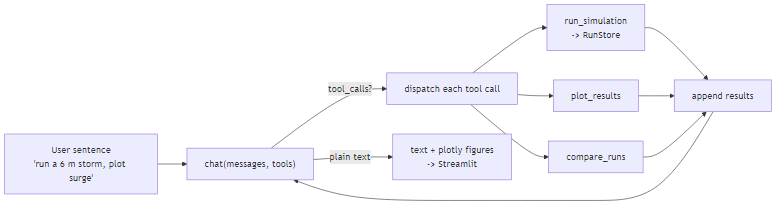
The important boundary is which side interprets the sentence and which side runs the code. The model interprets. Python executes. The two never trade jobs.
One request, end to end
Here is what happens when the user types the storm request above.
The model receives the sentence together with the schema for
run_simulation. It emits a tool_calls field naming that function and
JSON-encoding the arguments (Hs=6, Tp=10, U_hub=12, TI=0.15). No
code has run yet. That payload is data.
The Python loop looks the name up in a registry, calls the real function,
and appends the return value to the conversation as a role="tool" message.
The model reads that message, decides it now needs a plot, and emits a
second tool call to plot_results with the just-returned run id. The loop
dispatches again. When the model has nothing left to call, it responds in
plain text and the loop exits.
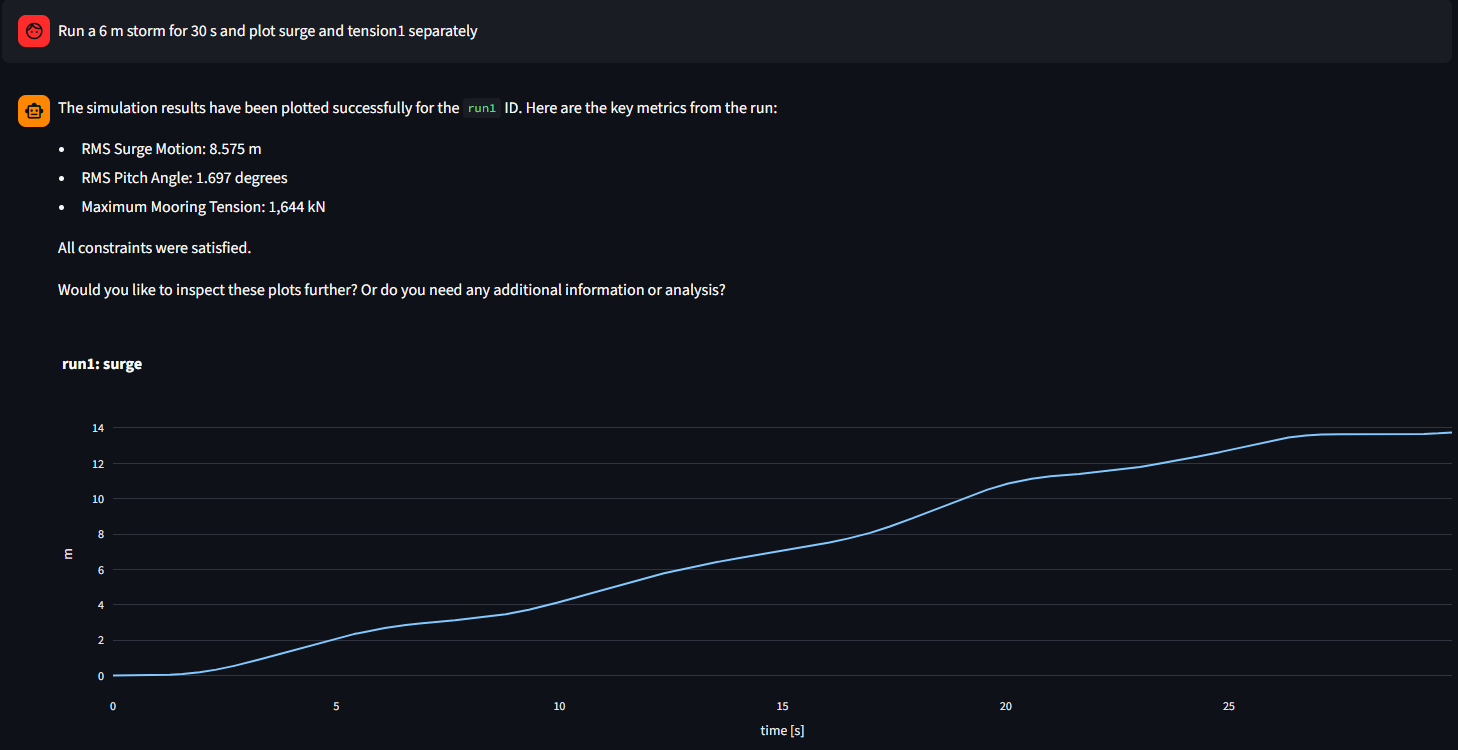
Two tool calls. One simulation. One plot. The engineering result was
produced by the same run_cosim() I would have called from a script.
What the LLM actually does
Giving the model a "tool" is not giving it the Python function. What you send is a JSON description of the function's signature:
run_simulation_schema = {
    "type": "function",
    "function": {
        "name": "run_simulation",
        "description": "Run and store the FOWT FMU for one wind/wave condition.",
        "parameters": {
            "type": "object",
            "properties": {
                "Hs":       {"type": "number"},
                "Tp":       {"type": "number"},
                "U_hub":    {"type": "number"},
                "TI":       {"type": "number"},
                "duration": {"type": "number"},
            },
            "required": ["Hs", "Tp", "U_hub", "TI"],
        },
    },
}
The public repo keeps the minimum/maximum fields on each argument. I
have dropped them here for brevity.
The orchestration loop wraps schema, dispatch, and the LLM call together:
def run_agent(user_text, store, max_steps=6):
    messages = [
        {"role": "system", "content": SYSTEM_PROMPT + "\n\n" + store.context()},
        {"role": "user",   "content": user_text},
    ]

    for _ in range(max_steps):
        response = client.chat.completions.create(
            model=model,
            messages=messages,
            tools=TOOL_SCHEMAS,
        )
        message = response.choices[0].message

        if not message.tool_calls:
            return message.content

        messages.append(message)
        for call in message.tool_calls:
            args   = json.loads(call.function.arguments)
            result = TOOLS[call.function.name](store, **args)
            messages.append({
                "role":         "tool",
                "tool_call_id": call.id,
                "content":      json.dumps(result),
            })

    return "Stopped after the maximum number of tool steps."
This is the core orchestration loop I use in the example. Deployment architecture and application-specific assurance sit alongside the tools in Python and are outside the scope of this article.
Why the boundary matters
The interface is not accidental. Every part of the system that produces a numerical result runs in Python, and every part that interprets a sentence runs in the model. That split is chosen.
An LLM is good at recognising that "a six-metre storm" and "Hs 6 m" refer to the same physical quantity, at selecting from a small menu of named actions, and at reading a structured result back into a paragraph. It is not good at faithfully executing a floating-wind co-simulation, and it should not be asked to.
The simulator has the opposite profile. It produces reproducible tension histories when the inputs are given exactly, and it rejects inputs outside its validated envelope. It has no idea what a user meant when they typed "a bad day at sea."
So the boundary sits where the change in guarantee happens. Above it, the system operates probabilistically over language. Below it, deterministically over numbers. Every design decision in this project rests on that line.
The tool schema is the treaty. It names the actions the model is allowed to propose, the argument types and ranges those actions accept, and the shape of the result the model will see. Anything that survives the schema check reaches the engineering code as ordinary Python values rather than raw language. Ambiguous requests are handled at the interface through ranges, enums, and required fields. Numerical behaviour stays an engineering-code concern.
State never crosses the line the wrong way. The RunStore is injected by
the loop, and the model never receives its contents to modify. Tool
results returned to the model are summaries rather than raw arrays, so
the conversation window stays a review surface. An unknown tool name or a
rejected argument comes back as an {"error": ...} dict the model reads
on the next turn.
The consequence is that the parts of the system that need to be dependable can be tested and audited as ordinary engineering software, while the LLM only has to be right about which tool to call. That is a much smaller reliability problem than "make the whole system safe with an LLM in the middle," and it is why the pattern generalises well.
What this looks like on the FOWT model
Everything above is generic. This section is what fires when the tool actually runs.
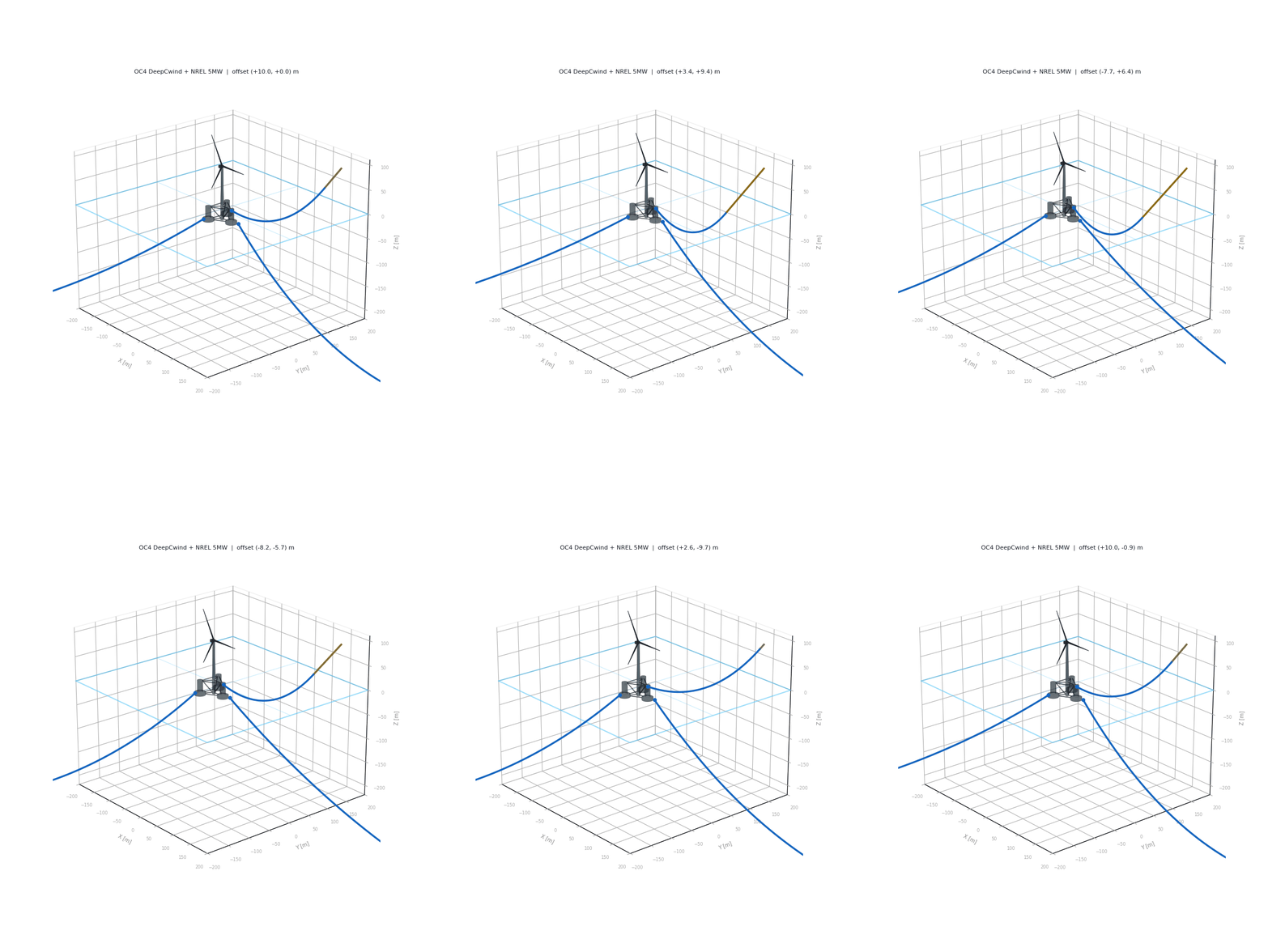
The OC4 DeepCwind semi-submersible sits under every chat response, the same platform and three-line catenary mooring the FMU is built on.
Inside run_cosim, the four numbers from the schema become a JONSWAP
irregular sea and a Kaimal turbulent wind, both feeding the FMU at
dt = 0.02:
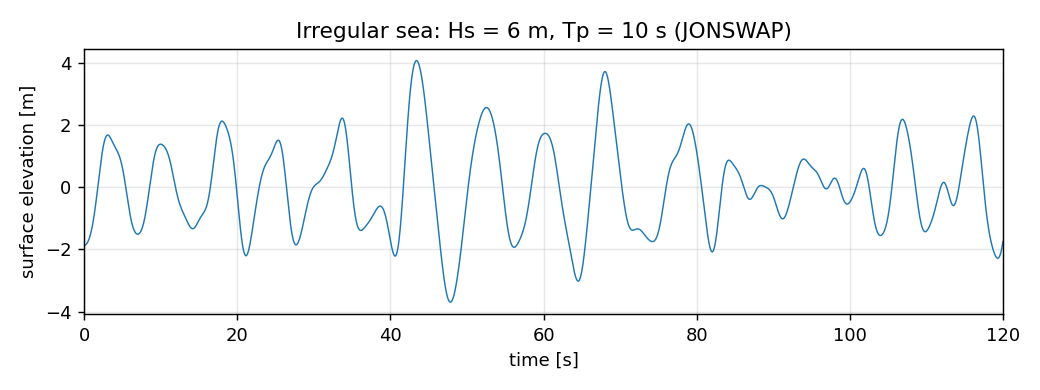
A "6 m / 10 s" tool call becomes this irregular surface trace, not a single 6 m wave. Every summary the agent reports (surge RMS, pitch RMS, mooring tension) is driven by time series that look like this.
A third tool, compare_runs, pulls one summary metric across two runs
already sitting in the RunStore, so a follow-up question can compare
without re-simulating.
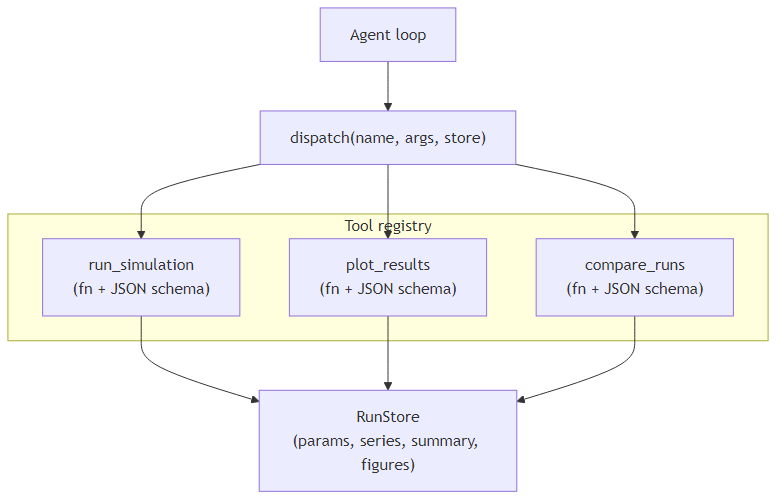
All three tools share the same in-memory RunStore. run_simulation
writes to it, plot_results and compare_runs read from it, and the
model itself never touches the store.
Scope and boundaries
The agent is deliberately supervisory. Numerical results continue to come from the existing simulation, and requests are constrained to its validated operating envelope. Ambiguous or unsupported requests should be clarified or rejected rather than converted into assumed engineering inputs. Real-time control and safety-critical decision making are outside the scope of this demonstrator.
The FMU envelope:
Hs(significant wave height): 1–10 m.Tp(peak wave period): 6–16 s.U_hub(hub-height wind speed): 4–25 m/s (NREL 5 MW operating range, above ~25 m/s the turbine would be shut down).TI(turbulence intensity): 0.06–0.20.duration: 1–60 s.
Plottable signals are fixed: surge, sway, heave, roll, pitch,
yaw, tension1, tension2, tension3. The geometry is fixed: OC4
DeepCwind semi-submersible, NREL 5 MW turbine, three-line catenary mooring
at 0°/120°/240°. The underlying numerical configuration remains the one
established in Part 2.
The demonstrator uses repeatable environmental realizations, so identical simulation requests return the same wave and wind and can be compared consistently.
The reusable idea
Nothing in the orchestration layer requires the underlying tool to be a floating-wind simulation. The same pattern can sit in front of an optimiser, a test-data workflow, or another existing engineering application.
What changes from application to application is not just the function name. The real work is deciding which capabilities should be exposed, how their inputs are constrained, what results should return to the model, and where engineering judgement must remain outside it.
Try the public example locally
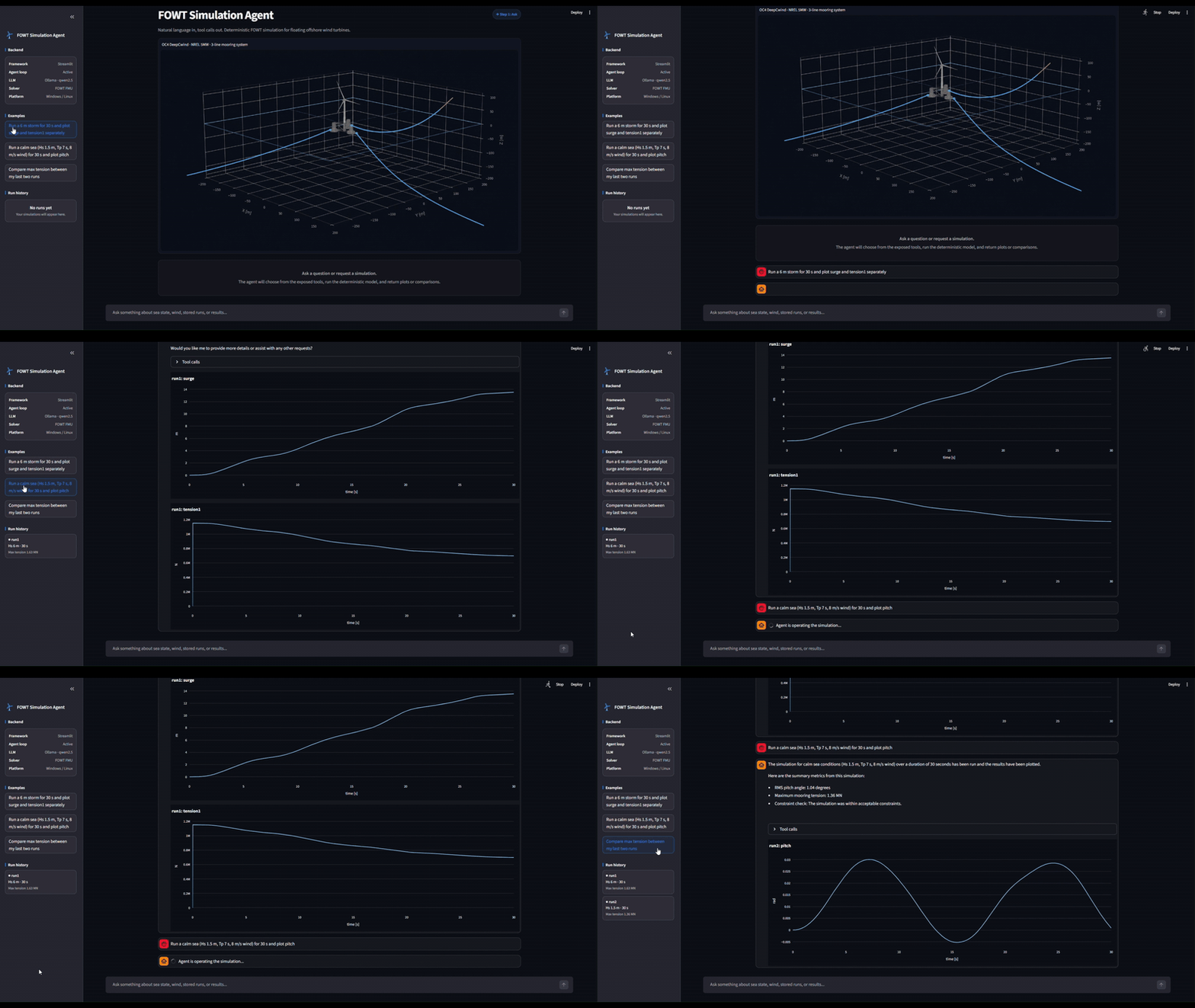
The full public example lives under
FOWT/agentic-simulation/: agent.py, simulation.py, app.py,
agent_demo.ipynb, and the FMU binary for your platform.

The default setup runs entirely on the local machine: Ollama at
http://localhost:11434/v1 with qwen2.5, and the platform-matched FMU.
Data never leaves the machine.
The repository contains the notebook, agent layer, and demonstrator used in this article.